Removing watermarks from listing photos in one click
The listing card now has a “Remove watermarks” button: the system finds logos and inscriptions on the photos, neatly paints them over and replaces the pictures with cleaned ones. The notification bell tells you when it is done.

Photos often arrive in a listing with somebody else’s marks on them: a platform logo in the corner, a website address, a listing number. You used to have to clean such pictures by hand in a graphics editor or reshoot them. Now it is done right in the listing form.
How it works
Open a listing in the admin panel. Under the photo upload block there is a “Remove watermarks” button. Press it and confirm the action, and the system queues the task for processing.
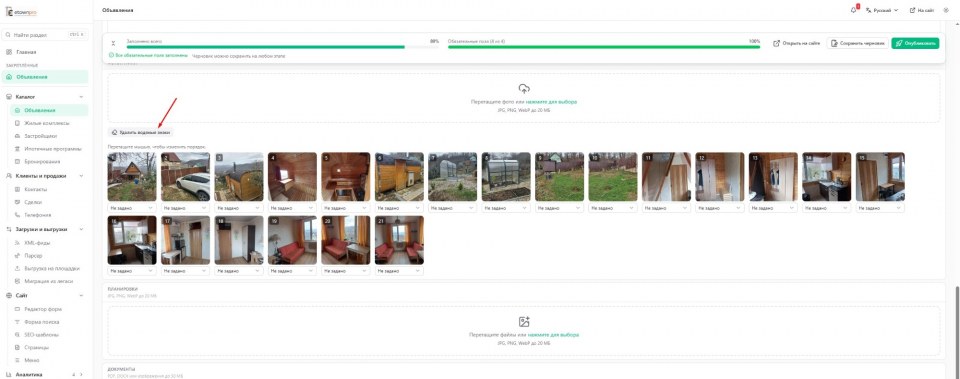
Then everything happens in the background:
- a neural network finds watermarks, logos and inscriptions on every picture, including faint translucent marks in the corners of the frame;
- the found areas are neatly painted over with regard to the surrounding background, so no smudge is left where the logo was;
- the cleaned picture takes the place of the original — the order of photos and their categories are preserved;
- if a photo has no watermark, it stays unchanged.
You can see what is happening
If the listing form is open, you can watch the processing in real time: photos in the queue are marked with an indicator, and cleaned pictures immediately appear in their places with a “Cleaned” label. A counter above the photos shows how many pictures are already done.
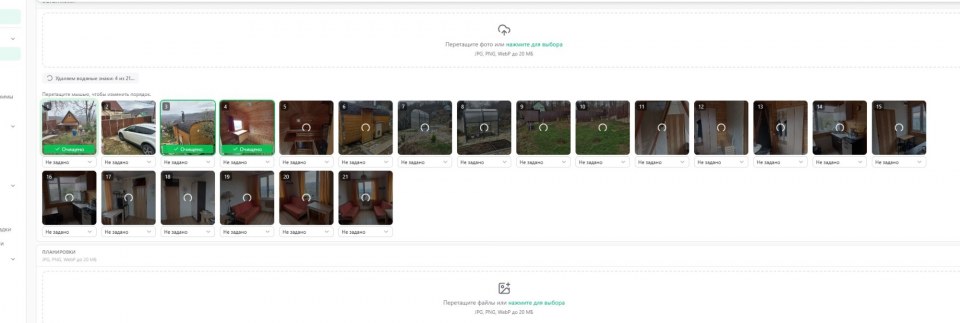
You do not have to wait on the page. You can close the form and do other things — when the processing finishes, a notification with the result and a link to the listing appears in the bell. The notification bell is now in the admin header as well, not only in the personal account.
What is important to know
- The original photos are replaced with the processed ones and originals are not kept — before starting, the system will ask you to confirm the action.
- Use this function only for pictures you have rights to: for example, for your own photos that came back to you with a platform logo.
- Processing one photo takes a few seconds, and a listing with 20 pictures is cleaned in a couple of minutes.
The feature is already available on all plans. If a mark remains on some picture, write to our support — send a link to the listing and we will take a look.